PAL-203000 & PAL-203030 | PalCare AiO Station Pull Cord and Call Cord
AIO stands for All-in-One. The AIO device functions as a pull cord, alert button, check-in button, rounds button, and assist button. Also available with a plug in call cord.
PAL-203000 - All-In-One Station - Standard Pull Cord
Functionality
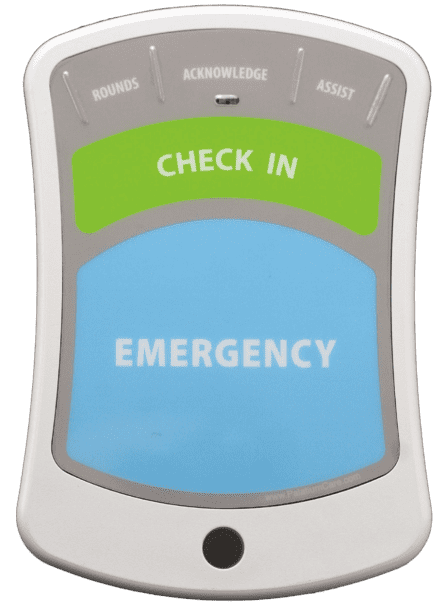 AiO StationPull Cord
Resident use - Red pull cord can be pulled downward to activate the alarm.
Emergency
Resident use - Blue Emergency button can be pressed to activate the alarm.
Check-In
Resident use - When a resident is enrolled in PalatiumCare's Check-In feature, this button can be pressed by the resident to check in every morning.
Acknowledge
Care staff use - Gray Acknowledge (top center) button can be pressed by staff to reset or clear an active alarm.
Rounds
Care staff use - Gray Rounds (top left) button can be pressed by staff to record a rounds check in the resident's apartment.
Assist
Care staff use - Gray Assist (top right) button can be pressed by staff to send an ASSIST alarm to other caregivers.
Reset
Maintenance staff use - Reset button, located on the circuit board inside of the All-In-One, can be used for resetting the device after battery replacement and for learn-in.
PAL-203030 - All-In-One Station - Momentary Call Cord
Functionality
Pull Cord (Optional)
Resident use - If installed, red pull cord can be pulled downward to activate the alarm. Not included by default with this device
Emergency
Resident use - Blue Emergency button can be pressed to activate the alarm.
Call Cord
Call cord can only be used with PAL-203030 AiO Stations and cannot be plugged into PAL-203000 AiO Stations. When the button is pressed on the call cord, the AiO Station activates an alarm.
Check-In
Resident use - When a resident is enrolled in PalatiumCare's Check-In feature, this button can be pressed by the resident to check in every morning.
Acknowledge
Care staff use - Gray Acknowledge (top center) button can be pressed by staff to reset or clear an active alarm.
Rounds
Care staff use - Gray Rounds (top left) button can be pressed by staff to record a rounds check in the resident's apartment.
Assist
Care staff use - Gray Assist (top right) button can be pressed by staff to send an ASSIST alarm to other caregivers.
Reset
Maintenance staff use - Reset button, located on the circuit board inside of the All-In-One, can be used for resetting the device after battery replacement and for learn-in.
Common AiO Station Issues and Troubleshooting
| Issue | Troubleshooting Steps |
| Beeping and flashing once per second | Constant beeping and flashing indicates critical low battery. Replace battery immediately. |
| Constantly going into alarm | Press Acknowledge button. If light flashes red and beeps 3 times check the diving board for constant activation. Also could be caused by misalignment of front membrane switch. |
| Low battery not clearing | Press reset button immediately after replacing battery. Low batteries can take up to 24 hours to clear from PalatiumCare. If low battery does not clear, check voltage of battery with multimeter. |
| Beeping Once Every Five Seconds | Green/Blue transmitter board needs to be reseated. Use a Phillips screwdriver to remove the transmitter board and reinstall it. Test again. |
| Pull Cord pulled out | Cut tied end off of pull cord. Restring through hole in bottom of AIO and hole in diving board. Retie with a double knot. Test knot by pulling on cord to tighten the knot and ensure it wont slip. |

Always use Panasonic Lithium CR123A Batteries in PalCare All-In-One Stations